Engineering Services

WordPress & WooCommerce Maintenance for Sites That Can't Afford to Just Sit There.

We provide ongoing engineering support for WordPress and WooCommerce sites — bug fixing, security hardening, uptime monitoring and core/plugin compatibility — with the same discipline as the original build, not a rotating support queue.

8+ Years Engineering Experience Real Engineers, Not a Ticket Queue Security-First Maintenance Works on Sites We Didn't Build

The Problems We Solve

Engineering Solutions for Complex Maintenance & Engineering Support Challenges.

A site that launches well doesn't stay well by default — WordPress core updates, plugin updates, and a changing threat landscape all keep moving after go-live. Most "maintenance plans" amount to running an update button on a schedule. The ten problems below are what real ongoing engineering support is actually protecting against.

  • Unpatched Security Vulnerabilities

    Known vulnerabilities in outdated core, themes or plugins — the single most common way a WordPress site gets compromised, and the easiest to prevent with real oversight.

  • Plugin & Core Update Conflicts

    A routine WordPress or plugin update that quietly breaks a feature elsewhere on the site — the reason updates need real testing, not a one-click auto-update and hope.

  • Site Downtime & Outages

    Every minute of downtime on a revenue-generating site has a direct cost — and the difference between a five-minute incident and a five-hour one is usually whether anyone was actually watching.

  • Malware & Compromise

    Injected code, defaced pages, or a site quietly being used to send spam — often discovered by a customer or a search engine before the site owner notices anything wrong.

  • Broken Functionality Over Time

    Features that worked at launch and quietly stop working months later — a third-party API changed, a plugin was abandoned, a dependency shifted underneath the site.

  • Performance Degradation

    A site that gets slower over time as content and plugins accumulate — degradation nobody notices happening gradually until it's already a real problem.

  • No Real Backup Strategy

    Backups that exist but have never actually been tested for restoration — which, in practice, is close to having no backup at all.

  • Inherited Technical Debt

    A site built by a previous developer with decisions no longer documented anywhere — every fix has to start with reverse-engineering what's actually there.

  • No Emergency Response Plan

    A site going down or getting compromised with no clear process for who responds, how fast, or what "fixed" actually means — costing hours in coordination before any real work starts.

  • Compliance & Standards Drift

    Payment, privacy or accessibility requirements that shift over time, quietly leaving a site out of compliance with rules that didn't exist — or weren't enforced — at launch.

What We Do

Our Maintenance & Engineering Support Services.

Maintenance work spans routine upkeep and real emergency response — the ten services below cover both ends of that range, engineered to the same standard as the original build rather than a generic support-ticket process.

  • Managed Core & Plugin Updates

    Updates tested on a staging environment before going live, catching conflicts before they reach your production site.

  • Security Monitoring & Hardening

    Ongoing vulnerability monitoring, access control review, and hardening work engineered to close the routes a real attacker would try first.

  • Uptime Monitoring & Incident Response

    Real-time uptime monitoring with a clear escalation and response process, so downtime is caught and addressed in minutes, not discovered by a customer.

  • Malware Removal & Remediation

    Compromise cleanup and root-cause remediation, closing the actual entry point rather than only removing the visible symptom.

  • Bug Fixing & Feature Repair

    Ongoing engineering support for functionality that breaks or degrades over time, engineered to the same standard as the original build.

  • Backup & Disaster Recovery

    Real, tested backup strategies with verified restoration — not backups that exist on paper but have never actually been proven to work.

  • Legacy Site Takeover

    A technical audit and clean handover process for sites built by a previous developer, so ongoing support starts from a real understanding of what's actually there.

  • Emergency Response

    A defined, fast-response process for site-down or compromise scenarios — real engineers responding immediately, not a ticket entering a general queue.

  • Performance Health Checks

    Regular performance review to catch gradual degradation before it becomes a real, customer-facing problem.

  • Technical Consulting & Roadmapping

    Ongoing technical advisory alongside maintenance — helping prioritise what to fix, what to rebuild, and what to leave alone as your site evolves.

Get the free WooCommerce Checkout Checklist

Monthly Plans

Keep Your WordPress Site or Store Healthy.

Engineers who know WordPress and WooCommerce look after your updates, backups and uptime. Store plans include Commerce Health PRO, so checkout problems are caught between visits.

WordPress sites

Site Care

For a blog, business, membership or course site that needs steady, safe upkeep.

$99 / month Regular price $129

Founding client price: first 5 clients, first 6 months

3 hours a month included

Free Commerce Health scans included. PRO is for WooCommerce stores.

  • Core, plugin and theme updates, tested on staging first
  • Backups with a monthly restore test
  • Uptime monitoring
  • Monthly health report
  • Reply within 1 business day
Start with a free audit
WooCommerce stores

Store Care

For a store that needs steady, safe upkeep.

$149 / month Regular price $199

Founding client price: first 5 clients, first 6 months

5 hours a month included

Commerce Health PRO included (1 site)

  • Core, plugin and theme updates, tested on staging first
  • Backups with a monthly restore test
  • Uptime monitoring
  • Monthly health report
  • Reply within 1 business day
Start with a free audit

Which plan fits? Blogs, business sites, membership and course (LMS) sites: Site Care. Online stores, including stores that sell subscriptions with WooCommerce: Store Care or Store Care Plus. Plugin-specific work, such as setting up a course or membership plugin, is quoted separately.

For agencies: engineering hours on retainer

WordPress and WooCommerce engineers behind your brand. Unused hours roll over for one month. White-label reports available.

Talk to us
  • 10 hours $300 / month $30 an hour
  • 20 hours $500 / month $25 an hour
  • 40 hours $900 / month $22.50 an hour

Month-to-month, no lock-in. No set-up fee for founding clients. Support hours and time zone are agreed when you start.

Clear Scope

What the Plan Covers, and What It Doesn't.

So there are no surprises, here is what sits outside your monthly plan and how we handle it.

What's not included

Not included in the planHow we handle it
New features and custom development
Quoted separately
Redesigns, new pages, content, images
Quoted separately
Problems that existed before we started
Listed in your first report, then quoted
Bugs only a plugin or theme vendor can fix
We report it and can build a workaround as quoted work
Hosting, server, domain, DNS and email problems
We advise and work with your host; more is quoted
Cleaning a site that was hacked before it joined
Quoted separately
Migrations, host moves, large upgrade projects
Quoted separately
Work beyond your included hours
Extra hours at the plan-member rate
Third-party costs (licenses, hosting, CDN)
Paid by you
Problems on a payment provider's side
We help find them; we can't fix their system
24/7 cover, guaranteed recovery times, unlimited requests
Not offered

Extra work and quotes

  1. Tell us what you need.
  2. We send a written estimate: a fixed price, or hours at the plan-member rate.
  3. We start only after you approve it.
Plan members
$55 an hour
Everyone else
$75 an hour
Minimum
1 hour
Jobs over about 8 hours
Fixed price, 50% up front
Emergency work outside a plan
Plan-member rate plus 50%
Estimates valid for
14 days

How It Works

From Free Audit to Your First Report.

You see what we find before you pay anything.

  1. Free Request your free audit Send the audit form with your site address, host and any worries. No card needed.
  2. Get your audit report A written report within 2 business days, whether or not you hire us.
  3. Choose a plan We recommend one that fits. First check within 3 business days of joining.
  4. Set-up Backups verified with a restore test, staging, monitoring, and Commerce Health PRO installed.
  5. Month one begins Your first report arrives at the end of the month.

If your site needs repairs first, we'll say so and quote them separately before you enroll. We may decline a site we can't maintain safely, for example one with no backups we can restore.

Start with a free audit

Featured Case Studies

Real Maintenance & Engineering Support Engagements.

Real maintenance and stabilisation engagements pulled directly from our Case Studies system — including full store stabilisation work for a high-traffic WooCommerce site under real operational pressure.

  • Root-Caused E-Commerce

    WooCommerce Stabilisation for a High-Traffic Store

    Root-caused and resolved fatal errors, checkout bugs, and broken shipping logic on a high-traffic WooCommerce store, fixed at the cause rather than patched.

    Result: Fatal errors, checkout bugs and shipping failures resolved at their cause

    Read Case Study

See all case studies

Our Engineering Process

How We Deliver.

Ongoing support only works if it starts from an accurate picture of what's actually running on your site — not assumptions carried over from the original build, which may no longer be accurate months or years later. Our process starts with a real audit, every time, including sites we didn't originally build.

Discovery

A technical audit of your current site — plugins, hosting, backup strategy and known issues — before any ongoing support begins.

Architecture

A support plan matched to your site's real risk profile — what needs monitoring, what needs hardening, what can wait.

Development

Fixes and improvements implemented against the agreed plan, staged and tested before reaching production.

Testing

Every update or fix verified on staging first, so a routine change never becomes a surprise outage.

Deployment

Changes deployed in planned windows, with monitoring active from the moment they go live.

Support

Continuous monitoring, response and reporting — the ongoing relationship this service exists for, not a one-time fix.

How We Maintain

Five parts we keep watching.

Maintenance is a loop, not a one-off job. Select a part of the loop to see what we do and what we use.

Updates

What goes wrong

A routine update breaks a feature, or updates are skipped because they feel risky.

What we do

Test core and plugin updates on staging first, then release them.

Tools we use here

  • WP-CLI
  • Git

Security

What goes wrong

Known vulnerabilities and weak access control stay open.

What we do

Scan for vulnerabilities, review access and harden the routes attackers try first.

Tools we use here

  • Vulnerability Scanning
  • Firewall / WAF
  • Access Audits

Monitoring

What goes wrong

Downtime or errors found by a customer, not by you.

What we do

Monitor uptime and errors, and alert so we can respond in minutes.

Tools we use here

  • Uptime Monitoring
  • Error Logging
  • Alerting

Backup and recovery

What goes wrong

A backup that has never been tested for restoration.

What we do

Set up automated backups and verify that restoring actually works.

Tools we use here

  • Automated Backups
  • Version Control

Fixes and repair

What goes wrong

Features that stop working as APIs and plugins change underneath them.

What we do

Fix the cause, not only the symptom, and record what changed.

Tools we use here

  • PHP
  • MySQL
  • WP-CLI

How we check it. Update tests on staging, restore drills on the backups, and uptime and error alerts confirmed to reach a person.

Do It Yourself First

Three steps to safer updates.

Test the checkout after an update, catch plugin conflicts, and monitor checkout so you hear about problems first. Each step has a guide.

  1. Test after updates

    A short routine to check checkout works after any update.

    Guide · 6 min read

    How to Test WooCommerce Checkout After an Update (10-Minute Checklist)
  2. Catch conflicts

    How to find which plugin is causing a conflict.

    Guide · 5 min read

    How to Detect WooCommerce Plugin Conflicts
  3. Monitor checkout

    How to know checkout broke before customers tell you.

    Guide · 4 min read

    How to Monitor WooCommerce Checkout Automatically

Prefer a printable version?

WooCommerce Checkout Checklist: one page, free, no email needed.

Download the checklist (PDF)

KODENZO Commerce Health

Is your store as fast and healthy as you think?

Find out in a few minutes, free. Then let PRO watch checkout for you in the background.

  • Read-only checks across configuration, cache, database and updates
  • A health score with plain-language next steps
  • Nothing changes on your site, and no data is sent to us

Free on WordPress.org. Nothing in the free plugin is locked.

  • Measures real-visitor checkout speed (LCP, INP and CLS) in the background
  • Watches payments, checkout errors and plugin changes
  • Emails you when something needs attention

PRO tells you what it finds. It does not fix problems for you.

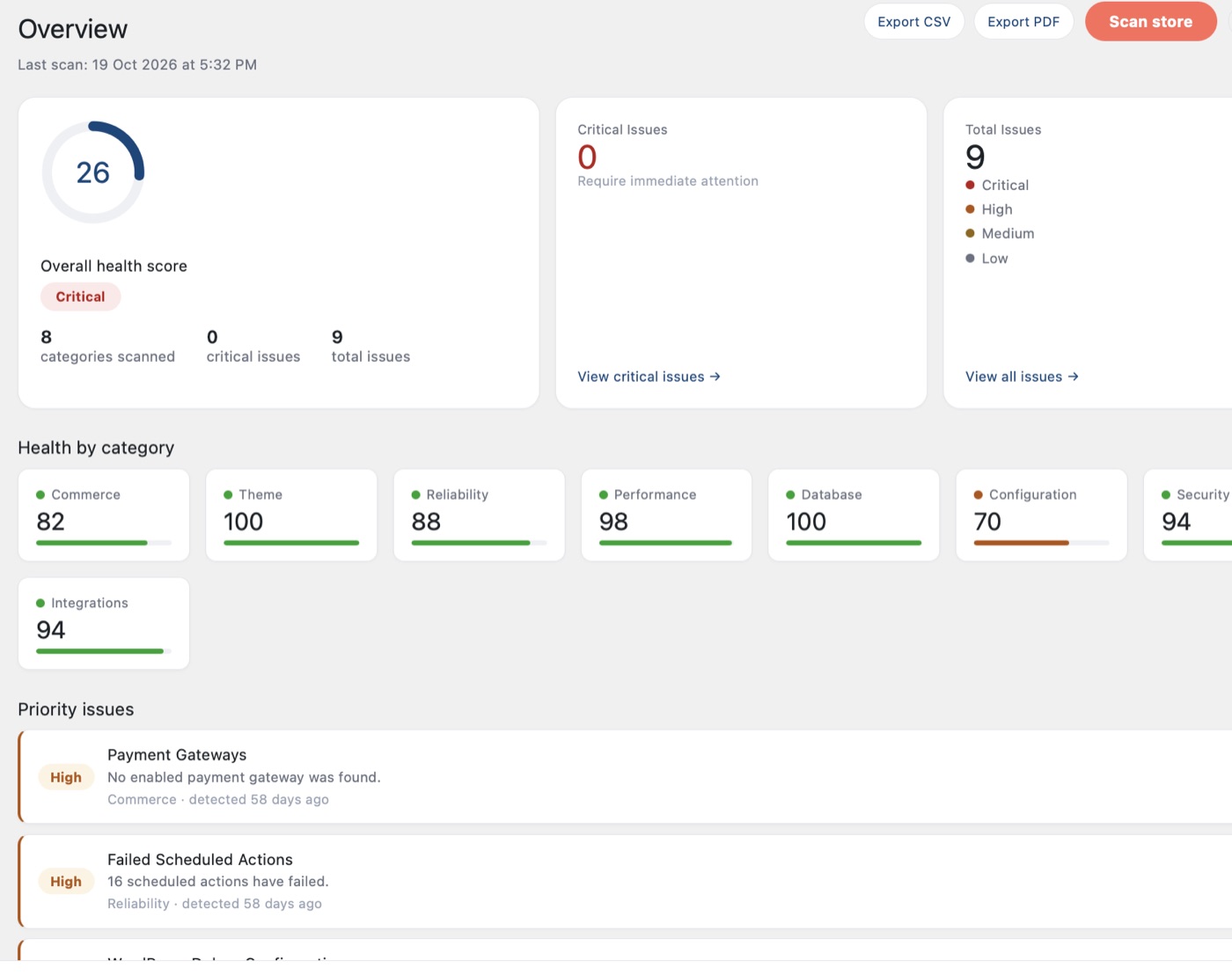
The Commerce Health Free Overview screen in WordPress: an overall health score, issue counts, health by category and a list of priority issues.
The free plugin's Overview: score, issues and health by category. Screenshot from a test store.
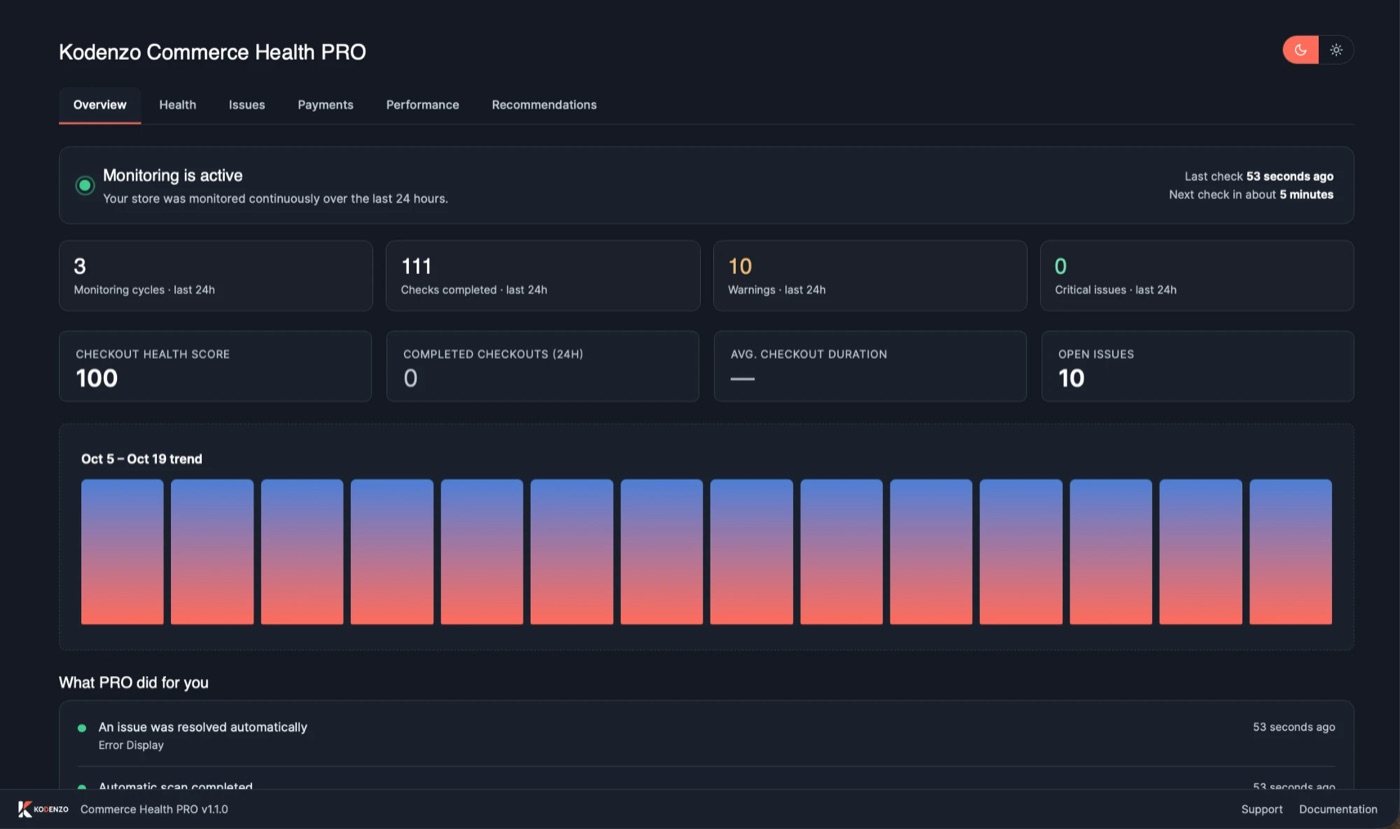
The Commerce Health PRO dashboard: monitoring status, checks completed in the last 24 hours, the checkout health score and a list of what PRO did.
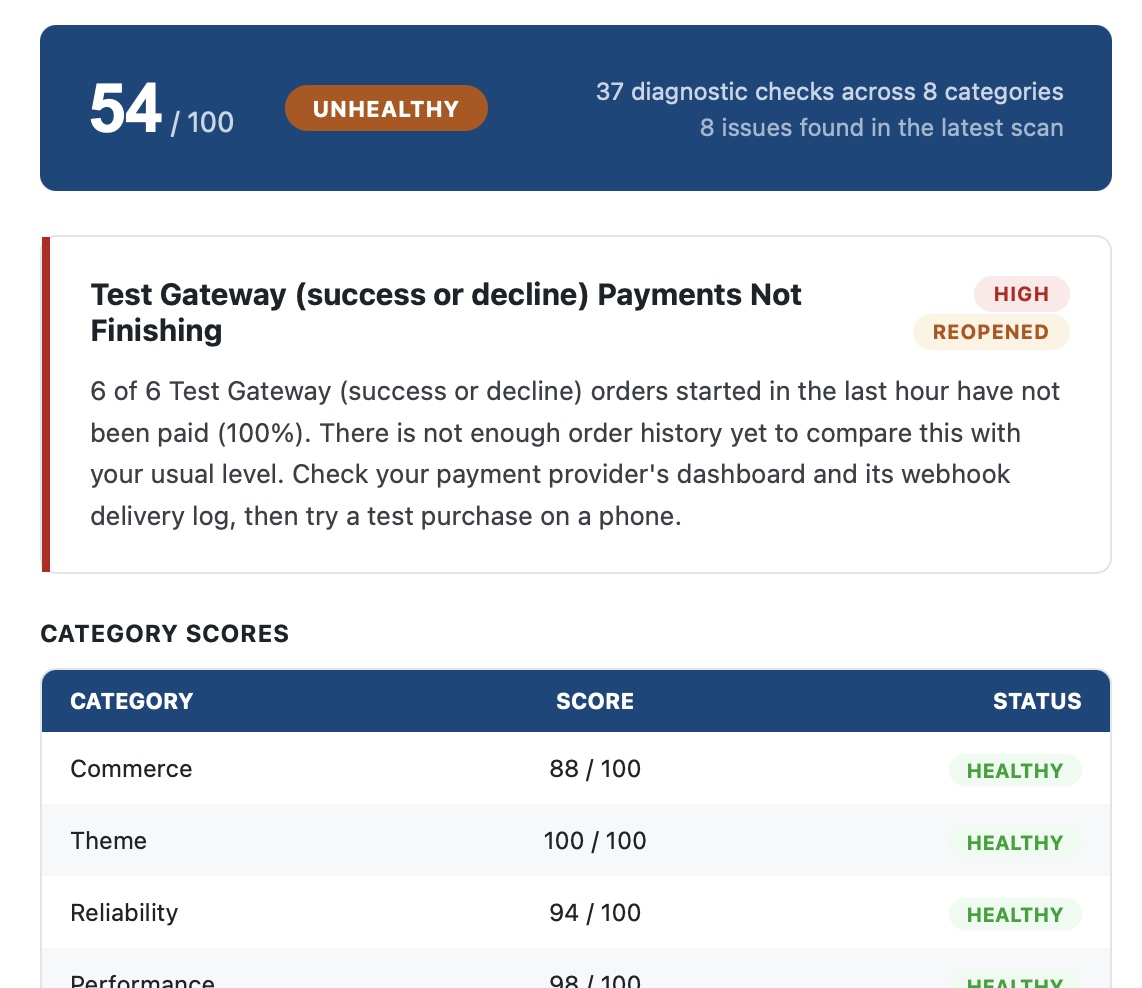
A Commerce Health PRO alert email: a health score, a high-severity issue that payments are not finishing, and category scores.
The PRO dashboard, and an alert email from PRO. Screenshots from a test store.

Why KODENZO

Engineering Partner, Not Just a Developer.

Most maintenance plans are a monthly update run by whoever's available. Here's what 8+ years of real engineering discipline applied to ongoing support actually changes.

  • Engineering First

    Real fixes, not surface-level patches.

  • Real Engineers, Not a Queue

    The same engineers, not a rotating support desk.

  • Security-First

    Hardening built into every routine update.

  • Real Business Experience

    Solutions based on real operational pressure.

  • Works on Sites We Didn't Build

    Starts with a real audit, every time.

  • Transparent Communication

    Clear updates and realistic expectations.

FAQ

Questions, Answered.

Straight answers to the questions we hear most often before a maintenance engagement starts — if yours isn't covered here, ask us directly.

Yes — including stores and sites we didn't build. We start with a technical audit so any ongoing support is based on how the site actually works today, not guesswork.

Managed core and plugin updates tested on staging first, security monitoring and hardening, uptime monitoring, bug fixing, and tested backup and recovery — the same engineering discipline as the original build.

Yes — malware removal and root-cause remediation, closing the actual entry point rather than only removing the visible symptom.

Emergency response is a defined process with real engineers responding immediately, not a ticket entering a general support queue.

Yes — a backup strategy is only real once restoration has actually been verified, not just configured and assumed to work.

Yes — a technical audit and clean handover process, so ongoing support starts from a real understanding of what's actually on the site.

Yes — WooCommerce's checkout, payment gateway and order-status systems need the same engineering discipline as the rest of the store, applied on an ongoing basis.

Both, depending on your site's needs — a structured ongoing plan for proactive monitoring and updates, alongside responsive support for anything that comes up in between.

No questions match your search.

Need Experienced Maintenance & Engineering Support Engineers?

Whether you're building a new commerce platform, optimising an existing store, or solving a complex engineering challenge, KODENZO can help.

Try Commerce Health Free