

What is inside
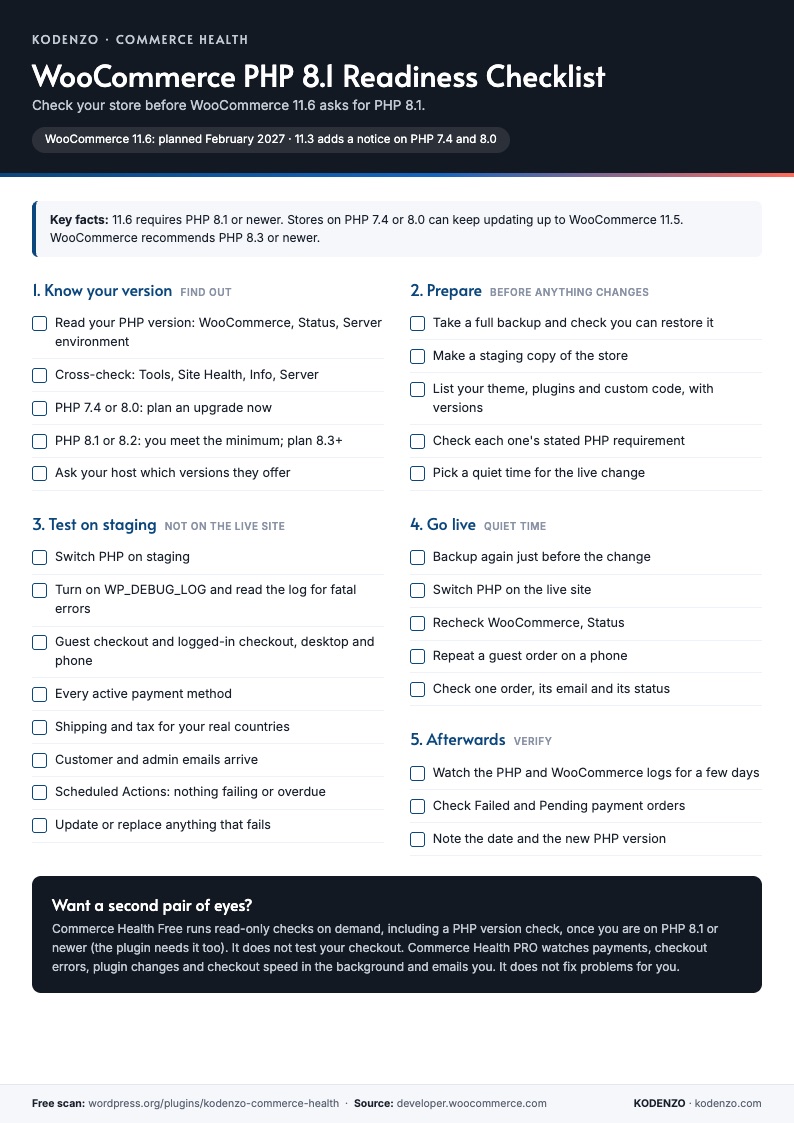
Five stages, from knowing your version to checking afterwards
Know your version
Where to read your PHP version, what WooCommerce 11.3 and 11.6 change, and which versions are affected.
Prepare
Backup, staging copy, and a list of your theme, plugins and custom code before anything changes.
Test on staging
Switch PHP on staging, read the error log, then test checkout, payments, shipping, tax and emails.
Go live and verify
Switch at a quiet time, recheck WooCommerce Status, repeat the checkout test and watch the logs.
Next step
Want it checked for you?
The checklist is the manual routine. Commerce Health covers the configuration checks once you are on PHP 8.1 or newer.
Run a free health check
Install Commerce Health Free on your upgraded staging site and get read-only checks and a health score, including a PHP version check. It needs PHP 8.1 itself.
Download Commerce Health FreeWant it watching after the change?
PRO watches payments, checkout errors, plugin changes and checkout speed in the background and emails you when something needs attention.
Explore Commerce Health PROGet new WooCommerce guides by email
Optional. The checklist downloads without it.
FAQ
Questions about the PHP 8.1 checklist
Is the PHP 8.1 checklist free?
Yes. It is a free one-page PDF and downloads straight away, with no email address needed.
When does WooCommerce require PHP 8.1?
WooCommerce 11.6, planned for February 2027. From WooCommerce 11.3, stores on PHP 7.4 or 8.0 see a dismissible notice. Dates can change, so check the official WooCommerce developer post.
Which PHP version does WooCommerce recommend?
PHP 8.3 or newer, according to WooCommerce server requirements. PHP 8.1 is the minimum for WooCommerce 11.6.
Will my store break if I stay on PHP 7.4 or 8.0?
WooCommerce says the change does not deactivate an existing installation, and WordPress will stop offering the update that needs newer PHP. You would stay on WooCommerce 11.5, which is only a temporary option.
Can Commerce Health run on PHP 7.4 or 8.0?
No. The plugin itself needs PHP 8.1, so WordPress will not activate it on older versions. Run it on your upgraded staging copy or after the upgrade. It does not test your checkout, so keep the manual checks.
From the Engineering Journal
WooCommerce Checkout Broke After an Update? How to Find What Changed
Checkout failed after an update? How to confirm it is really broken, find what changed, isolate the cause,…
How Agencies Can Standardise WooCommerce Store Health Reviews
A simple, repeatable process for reviewing every client WooCommerce store the same way: the checks, the record, the…
How to Choose a WooCommerce Developer: Questions to Ask and Warning Signs
How to choose a WooCommerce developer without relying on a portfolio alone: the questions that show how they…
More from KODENZO
WooCommerce Checkout Monitoring
Spot payment failures, checkout JavaScript errors and risky plugin changes before customers report them.
Commerce Health vs Manual WooCommerce Monitoring
Checking your store by hand is not the same as monitoring it. See what each catches and misses.
Black Friday Checkout Checklist
A free one-page checklist: what to freeze, test and watch before Black Friday and Cyber Monday.
- WooCommerce 11.6 requires PHP 8.1: how to check your store
- Free WooCommerce Checkout Checklist (PDF)
- Free WooCommerce health check
- Commerce Health PRO product page
Last updated