

What is inside
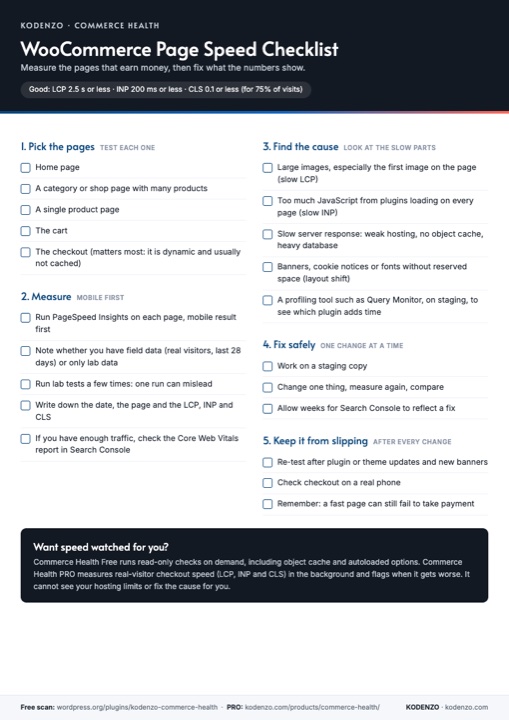
Five steps, from picking pages to keeping speed up
Pick the pages
Home, category, product, cart and checkout: test each, because a store is not one page.
Measure
PageSpeed Insights mobile first, field data versus lab data, and what to write down.
Find the cause
Large images, too much JavaScript, slow server response and layout shift.
Fix safely
Staging first, one change at a time, and measure again.
Next step
Want it checked for you?
The checklist is the manual routine. Commerce Health covers parts of it for you.
Run a free health check
Install Commerce Health Free and get read-only checks on demand, including object cache and autoloaded options size.
Download Commerce Health FreeWant checkout speed watched?
PRO measures real-visitor checkout speed (LCP, INP and CLS) in the background and flags when it gets worse. It cannot see hosting limits or fix the cause for you.
Explore Commerce Health PROGet new WooCommerce guides by email
Optional. The checklist downloads without it.
FAQ
Questions about the page speed checklist
Is the page speed checklist free?
Yes. It is a free one-page PDF and downloads straight away, with no email address needed.
Which pages should I test?
At least the home page, a category or shop page, a single product page, the cart and the checkout. Cart and checkout matter most because they are dynamic and usually cannot be cached like the rest of the site.
What are good LCP, INP and CLS values?
Google treats a page as good when at least 75% of visits have an LCP of 2.5 seconds or less, an INP of 200 milliseconds or less and a CLS of 0.1 or less.
Does Commerce Health measure page speed?
The Free plugin does not run speed tests. PRO measures real-visitor checkout speed in the background. Neither can see your hosting limits.
From the Engineering Journal
How Agencies Can Standardise WooCommerce Store Health Reviews
A simple, repeatable process for reviewing every client WooCommerce store the same way: the checks, the record, the…
How to Choose a WooCommerce Developer: Questions to Ask and Warning Signs
How to choose a WooCommerce developer without relying on a portfolio alone: the questions that show how they…
Configuration Checks, Monitoring and Test Orders: What Each Can and Cannot Tell You
Three ways to look after a WooCommerce checkout, and three different questions they answer. What each can and…
More from KODENZO
WooCommerce Checkout Monitoring
Spot payment failures, checkout JavaScript errors and risky plugin changes before customers report them.
Commerce Health vs Manual WooCommerce Monitoring
Checking your store by hand is not the same as monitoring it. See what each catches and misses.
Black Friday Checkout Checklist
A free one-page checklist: what to freeze, test and watch before Black Friday and Cyber Monday.
- How to check your WooCommerce page speed (guide)
- Free WooCommerce Checkout Checklist (PDF)
- Free WooCommerce health check
- Commerce Health PRO product page
Last updated