

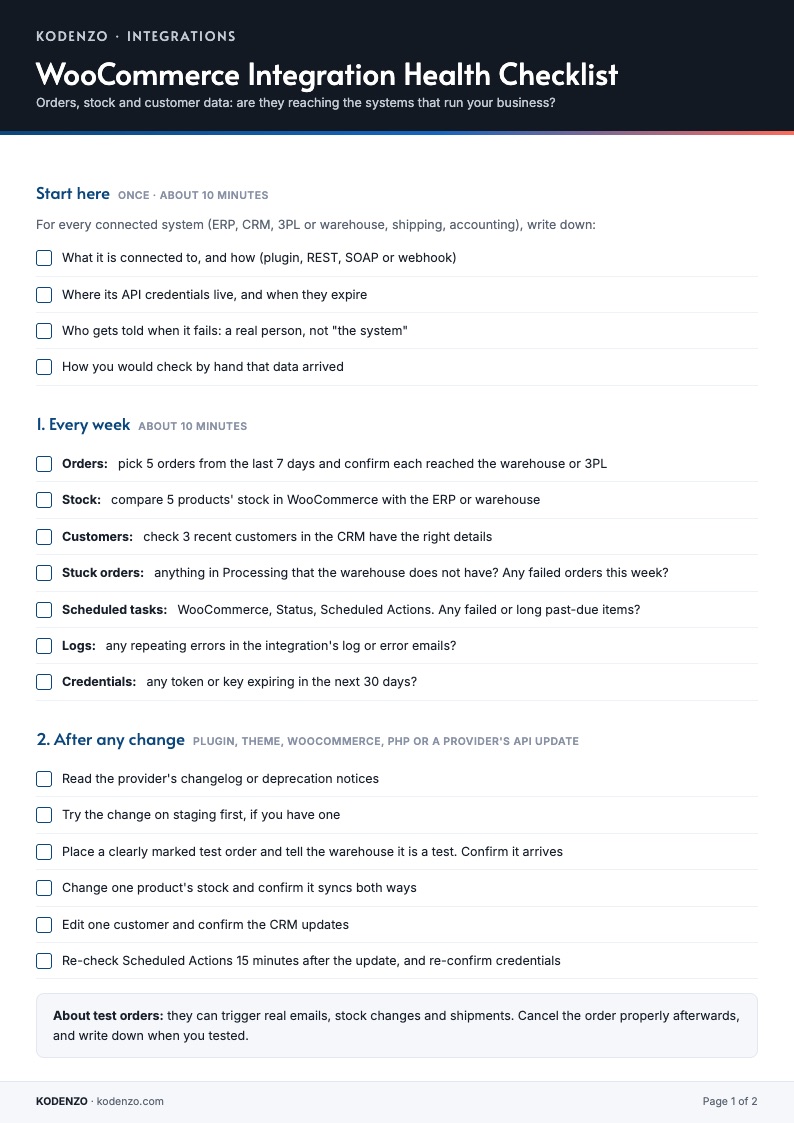
What is inside
A routine for connected systems
Start here
A ten-minute inventory of every connected system, its credentials and who is told when it fails.
Every week
Seven quick checks: orders, stock, customers, stuck orders, scheduled tasks, logs and expiring credentials.
After any change
Six checks after a plugin, theme, WooCommerce, PHP or provider API update.
If data stops arriving
Eight steps in the order that finds the cause fastest, and what common error codes usually mean.
Next step
Want your integrations checked for you?
The checklist is the manual routine. We build, troubleshoot and maintain WooCommerce integrations, and can check yours.
Run a free health check
Install Commerce Health Free for 34 read-only checks, including scheduled tasks and recent failed orders, and a health score.
Download Commerce Health FreeWant a free look at your integrations?
Ask for a free store audit and we will tell you what we see.
Get a free auditGet new WooCommerce guides by email
Optional. The checklist downloads without it.
FAQ
Questions about the checklist
Is the WooCommerce integration checklist really free?
Yes. It is a free PDF and downloads straight away, with no email address needed.
Who is it for?
Anyone whose WooCommerce store sends orders to a warehouse or 3PL, syncs stock with an ERP or accounting system, or sends customers to a CRM, including the person who looks after the store for a client.
How often should I use it?
Use the weekly section once a week, the after-any-change section whenever you update a plugin, theme, WooCommerce, PHP or a connected provider, and the last section whenever data stops arriving.
Is it safe to place a test order?
Test orders can trigger real emails, stock changes and shipments. Tell the warehouse it is a test, use a clearly marked order, and cancel it properly afterwards.
Does the free Commerce Health plugin check my integrations?
No. It runs read-only checks on your store, including scheduled tasks and recent failed orders, which can be early signs of a sync problem. It does not check the connection to your ERP, CRM or 3PL.
From the Engineering Journal
WooCommerce Checkout Broke After an Update? How to Find What Changed
Checkout failed after an update? How to confirm it is really broken, find what changed, isolate the cause,…
How Agencies Can Standardise WooCommerce Store Health Reviews
A simple, repeatable process for reviewing every client WooCommerce store the same way: the checks, the record, the…
How to Choose a WooCommerce Developer: Questions to Ask and Warning Signs
How to choose a WooCommerce developer without relying on a portfolio alone: the questions that show how they…
More from KODENZO
WooCommerce Checkout Monitoring
Spot payment failures, checkout JavaScript errors and risky plugin changes before customers report them.
Commerce Health vs Manual WooCommerce Monitoring
Checking your store by hand is not the same as monitoring it. See what each catches and misses.
Black Friday Checkout Checklist
A free one-page checklist: what to freeze, test and watch before Black Friday and Cyber Monday.
Last updated